Arrow down
arrow down
Arrow down
Arrow down
Arrow down
solution guide

Forward Networks Digital Twin Prevents Misconfigurations Identified By CISA and NSA

In a recently released Cybersecurity Advisory from the National Security Agency (NSA) and Cybersecurity and Infrastructure Security Agency (CISA) highlighted the most common cybersecurity misconfigurations in large organizations identified through blue team and red team assessments.
Who should read?
What is covered in this content? Why is this content important?
Table of Contents

In a recently released Cybersecurity Advisory from the National Security Agency (NSA) and Cybersecurity and Infrastructure Security Agency (CISA) highlighted the most common cybersecurity misconfigurations in large organizations identified through blue team and red team assessments. The advisory stated that these misconfigurations illustrate systemic weakness in many large organizations, including those with mature cyber postures.

The advisory called on both organizations and software developers to take actions that will prevent malicious actors from taking advantage of these vulnerabilities. Organizations are advised to take steps such as:

  • Removing default credentials and hardening configurations.
  • Disabling unused services and implementing access controls.
  • Updating regularly and automating and prioritizing patching of known exploited vulnerabilities.
  • Reducing, restricting, auditing, and monitoring administrative accounts and privileges.

In addition to following these recommendations, Forward Enterprise helps organizations ensure their network is free of half of the most commonly identified cybersecurity misconfigurations. This document will highlight where Forward Enterprise can help identify these misconfigurations to assist in their remediation.

Forward Networks can prevent 5 of the ten common misconfigurations identified by CISA and NSA

  1. Default configurations of software and applications
  2. Improper separation of user/administrator privilege
  3. Insufficient internal network monitoring
  4. Lack of network segmentation
  5. Poor patch management
  6. Bypass of system access controls
  7. Weak or misconfigured multifactor authentication (MFA) methods
  8. Insufficient access control lists (ACLs) on network shares and services
  9. Poor credential hygiene
  10. Unrestricted code execution

Tired of Outages and Hidden Network Risks?

See why industry leaders use Forward Enterprise's digital twin to gain unparalleled visibility into complex multi-vendor networks, automate compliance checks, and prevent costly downtime.
Tour the entire platform in 14 minutes.
Watch the Instant Demo

Default configurations of softwareand applications

Per the advisory, default configurations of systems, services, and applications can permit unauthorized access or other malicious activity.

Network devices are configured with standard settings when they are first installed. Some standard configurations allow you to access the device remotely to provision or start the setup process. Not changing these default configuration elements leaves the device open to malicious actors who can authenticate and gain administrative access.

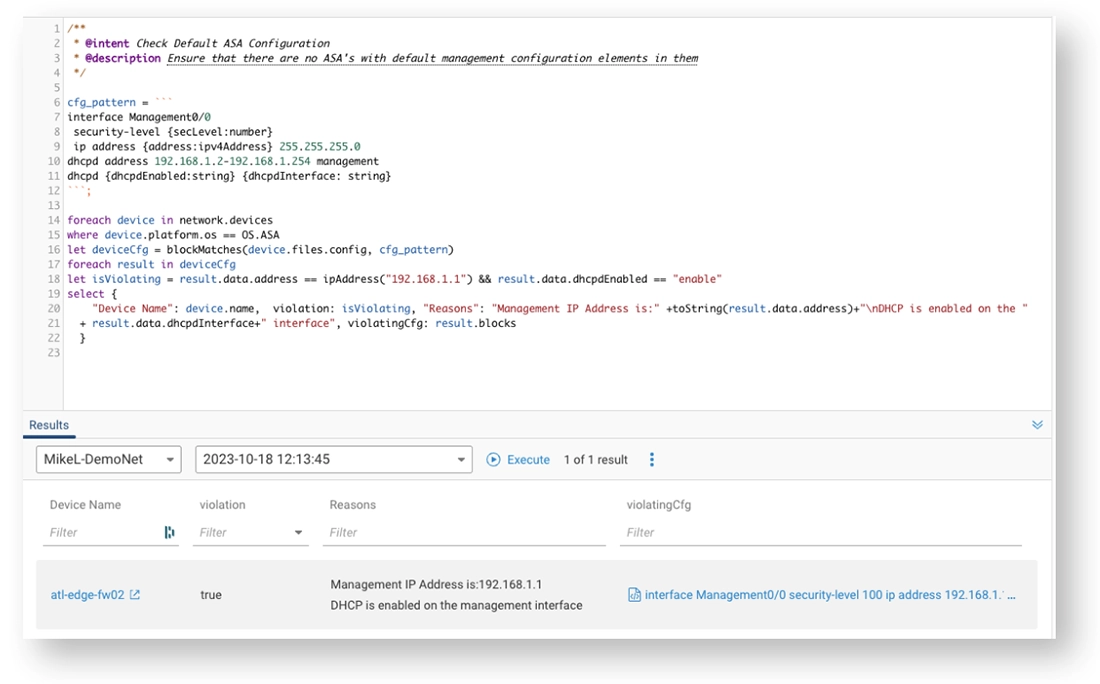
Forward Enterprise aids in identifying devices with default configuration still applied to them using our query language, Network Query Language, or NQE. Using a query that searches for default configuration specifications will continuously check for their presence. If a default configuration is located, the platform will alert the NetOps team through email or automatically create an incident ticket in ServiceNow with all the relevant details (see Figure 1 for a sample query).

Sample NQE verification check for default device configurations
Figure 1: Sample NQE verification check for default device configurations

Insufficient internal network monitoring

Assessment teams from NSA and CISA have exploited insufficient monitoring to gain access to the networks they were assessing. According to the alert, insufficient monitoring can lead to an “adversarial compromise.”

Organizations have several tools to monitor the network, looking for typical SNMP traps. Also, there could be several traps along the network path to allow for collection and analysis of traffic going through the network. This analysis can sometimes be incomplete for several reasons: misconfigured sensors, misconfigured collectors, or collectors and sensors not deployed across the whole infrastructure.

Network Behavior Monitoring

The verify and exposure analysis functionality in Forward Enterprise provides NetOps and SecOps professionals access to data that would be extremely difficult to collect and analyze manually. Verify functionality automatically checks the network with every snapshot collection to verify that desired network conditions persist between collections. This ensures that the network will continue to behave as intended.

Exposure Analysis

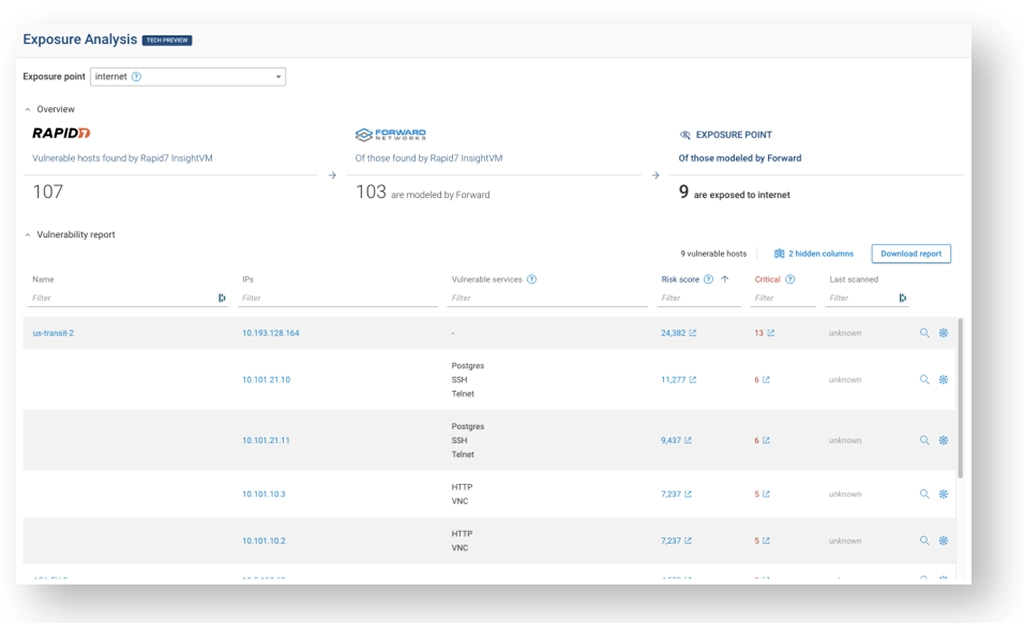
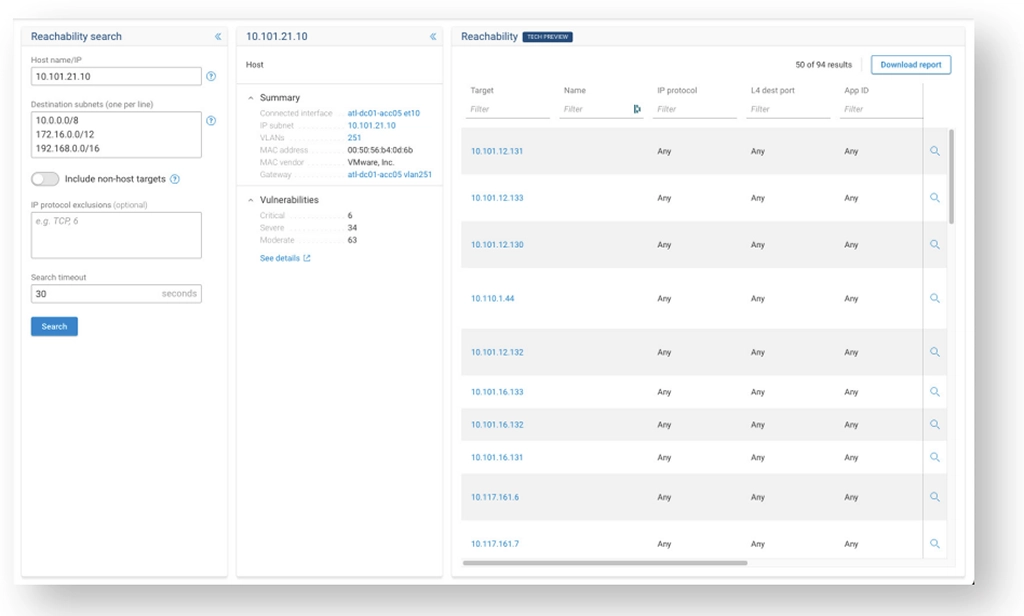
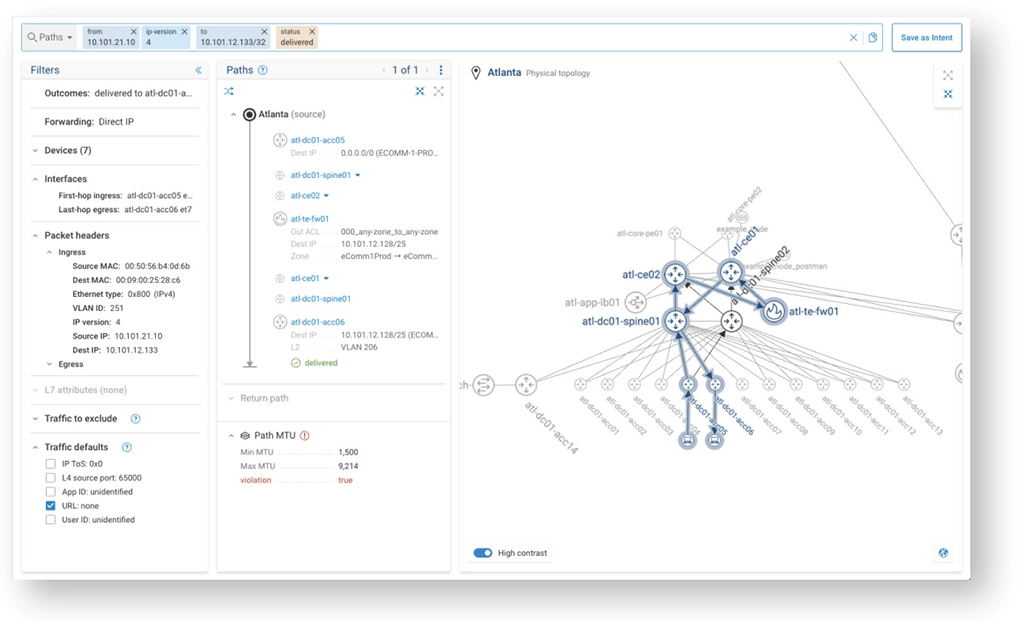
Forward Enterprise integrates with Rapid7 and Tenable by combining the identified host vulnerabilities from these tools and enriching them with the network state and configuration data within the platform. Forward Enterprise delivers SecOps teams a prioritized remediation plan based on host exposure (see Figure 2). Taking it a step further, the reachability search identifies all devices reachable by a vulnerable host, and then verification checks can ensure reachability or isolation from specific destinations (see Figure 3). The Blast Radius Feature depicts reachability between vulnerable hosts and network devices (see Figure 4).

Rapid7 integration identifying vulnerable hosts
Figure 2: Rapid7 integration identifying vulnerable hosts
Reachability Search
Figure 3: Reachability Search
Blast Radius
Figure 4: Blast Radius

Lack of network segmentation

According to the alert, lack of network segmentation leaves no security boundaries between the user, production, and critical system networks. Insufficient network segmentation allows an actor who has compromised a resource on the network to move laterally across various systems uncontested. Lack of network segregation also leaves organizations significantly more vulnerable to potential ransomware attacks and post-exploitation techniques.

Most organizations do not have current, accurate documentation of their network segmentation. One company paid a consulting firm $3 million for an enterprise segmentation map. It took the firm three months to complete the work, meaning it was out of date even before delivery.

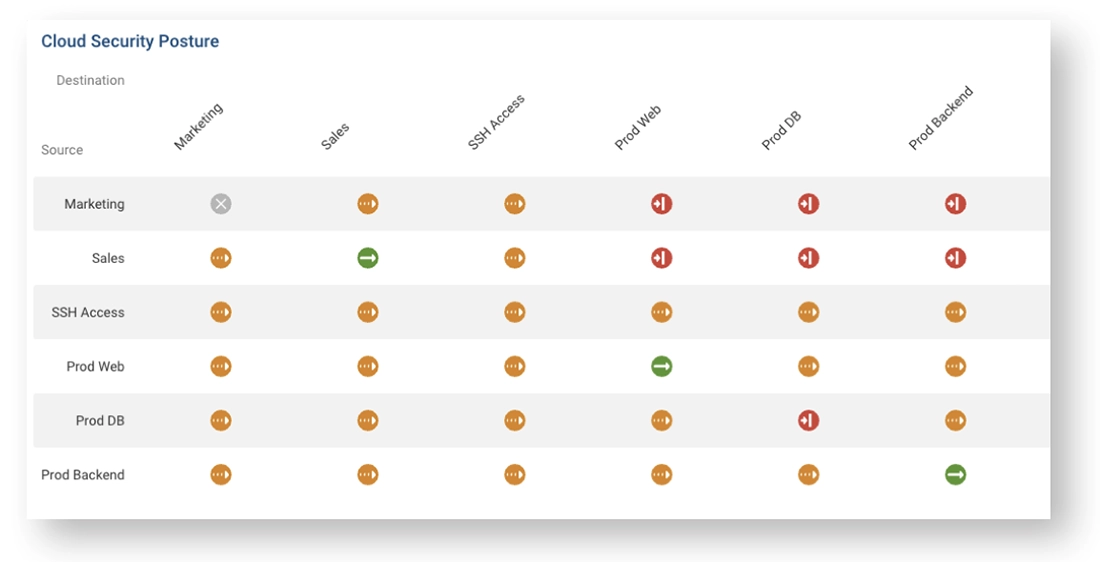
Using Forward Networks’ mathematically accurate digital twin, IT professionals can run on-demand posture assessments and view full connectivity, partial connectivity, or full isolation with 100% mathematical accuracy. Segmentation matrices can include the entire hybrid multi-cloud environment (see Figure 5). The matrices that are created are updated every time a snapshot is collected automatically, providing an up-to-date posture matrix with visibility into which changes may have created unintentional connectivity or isolation.

Security Segmentation Map for Cloud
Figure 5: Security Segmentation Map for Cloud

Poor Patch Management

Patch management due to vulnerabilities is one of the more critical network hygiene practices due to the sensitivity of what can be exploited given an active vulnerability. Poor patch management can include running out of support software and not updating your code versions when there is a vulnerability. The volume of patches and updates released by vendors, all for specific applications, makes patch management nearly impossible for large organizations.

When an onslaught of alerts occurs, the alert may be ignored due to alarm fatigue. Furthermore, professionals may not be confident the scanner is considering code versions or configurations that can trigger a vulnerability rather than assessing hardware and making assumptions.

Forward Networks Device Vulnerability Analysis

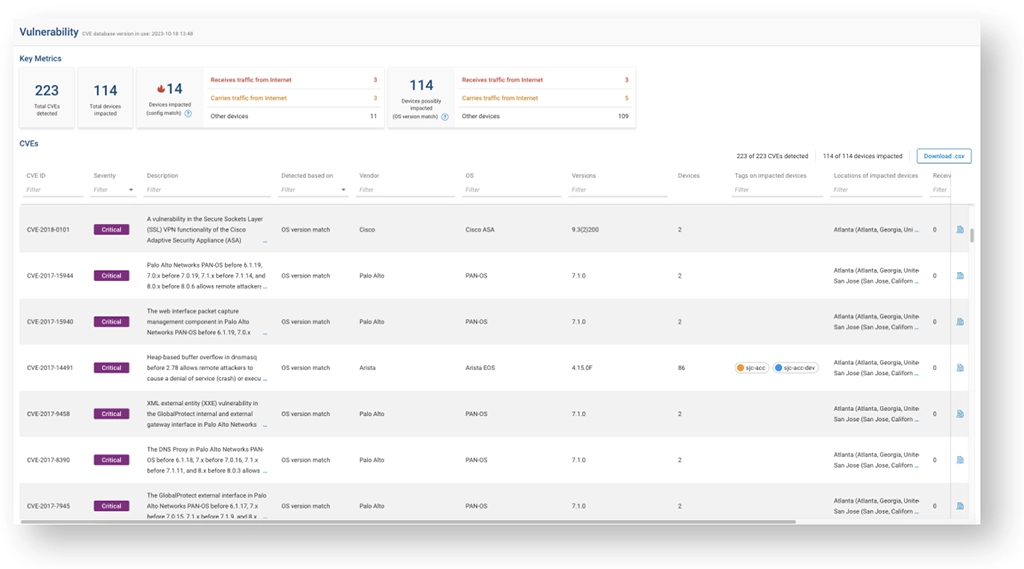
Forward Enterprise proactively identifies the at-risk devices in your network in an easy-to-read dashboard, using state and configuration data collected from your network and data from the NIST database and vendor vulnerability sites (see Figure 6). The platform supports Cisco, Juniper, Palo Alto, F5, CheckPoint, and Arista.

Forward Networks Risk Exposure Analysis

By combining network data with end-point vulnerability scan results, Forward Enterprise identifies devices exposed to the Internet. The platform gives engineers contextual information about vulnerable hosts and a prioritized end-host patching plan. The platform offers integration with Rapid7 and Tenable with support for more vulnerability scanners to be added in the future.

This enriched data gives the operator peace of mind to know precisely what vulnerabilities are in their network, delivering a prioritized remediation plan.

Sample Vulnerability Management Dashboard
Figure 6: Sample Vulnerability Management Dashboard

High-Quality Support, Greater Network Confidence

4.7 - from 33 Gartner Ratings
"The overall experience has been phenomenal, from onboarding the application in the environment to the timely and concise response from the Forward team about any questions we raise. The Forward team has been super helpful throughout this whole experience."
Request a personalized tour

Insufficient Access Control Lists (ACLs) on Network Shares and Services

Malicious actors often target network shares because access to them is less restricted. Not only does the organization have to worry about data exfiltration and what that data could be used for if in the wrong hands, but there is an increased risk of more sophisticated attacks using data obtained from network shares.

Assessment teams routinely find sensitive information on network shares that could facilitate follow-on activity or provide opportunities for extortion, such as cleartext credentials for service accounts, web applications, and even domain administrators. Securing shares and validating sufficient security is extremely challenging due to the volume of ACLs in the network. Forward Enterprise automatically verifies that access-control lists are at the desired level of the organization by using policy checks.

By creating a policy check that searches paths from address ranges that need (or do not need) access to file shares, ACL sufficiency can be tested and evaluated every time a collection is completed. Any deviation will trigger email alerts or, if desired, automatically create a ServiceNow incident ticket.

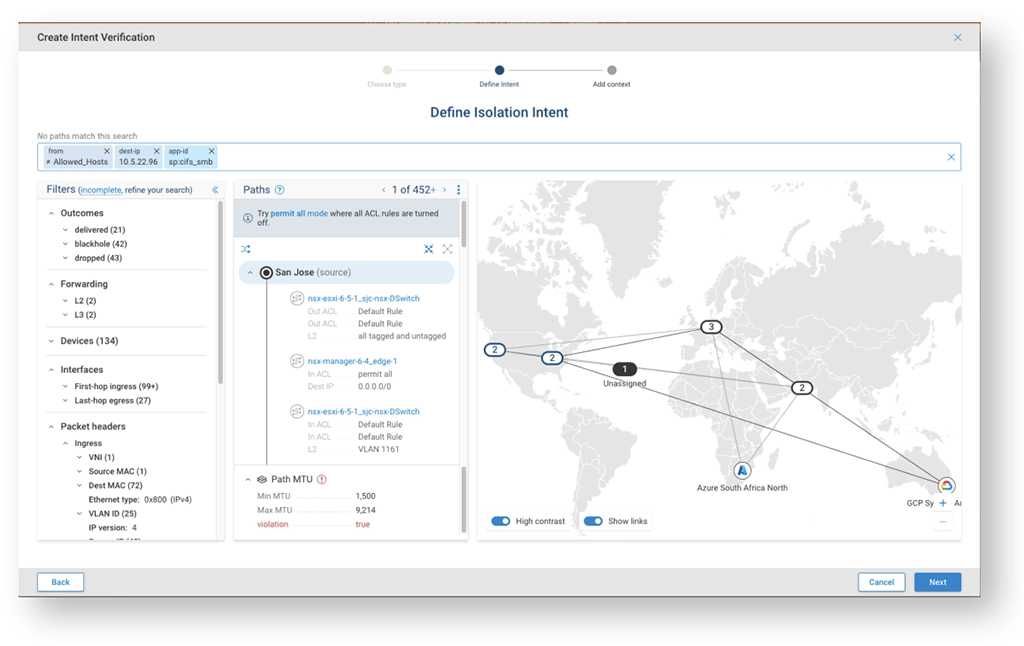
The below images show a path search from the allowed subnet that should be able to access a file server over a specific port. In the image below, we are looking for anything that is not from the host group called “Allowed_Hosts” that is able to access our SMB server over CIFS. If such a path exists, then this would be a violation, and an alert or ServiceNow incident ticket would be generated, depending on the integrations (see Figure 7).

Screenshot defining intent check
Figure 7: Screenshot defining intent check

How do I get Started?

To learn how Forward Networks is helping other agencies and large organizations prevent dangerous misconfigurations, please request a personalized technical session with a field engineer.

Subscribe to our newsletter

Make sure you don't miss a post by signing up here for our monthly 'Moving Forward' newsletter

Most Recent

Browse all posts

Learn What Forward Networks can do for you

Book a call with our product experts for a demo taylored to your environment or get asnswers immediately in our chat.
Top cross